Table of Contents
Related Zones
An operator handling an event opens the camera that fired, the zones standing beside it, or the whole site. On a site of forty cameras the third option is not an answer, so each camera carries the zones an installer named as covering the same approach, doorway or yard.
Set the list once during commissioning. An operator opens it from the event page, and on a site with an intruder panel it also decides which footage a panel zone's alarm marks.
What a Related Zone Is
A zone is a place on a site, and the camera watching it is the one TetherX opens. Related Zones names the other places an operator wants on screen at the same moment: the till beside the till that fired, the yard gate the car left through, the door at the other end of the corridor.
The list belongs to one camera and points one way. Naming the yard gate on the till camera does not name the till on the yard gate camera, so add the list to both cameras where both are worth opening.
Naming the Related Zones
- Go to Admin → Cameras
- Select the camera that raises the events you are answering
- On the Details tab, find Related Zones
- Choose the zones covering the same approach, then press Apply

Staff, administrators and integrators can edit the list. The picker offers the other zones on the same site that hold a camera, because a zone with no camera behind it puts an empty tile on the wall.
Tip: Two to four zones per camera keeps the wall readable. An operator opening twelve tiles at once reads none of them.
Opening the Wall from an Event
On the event page, Open Live offers three destinations:
- This Camera - the camera the event was filed against.
- Related Zones - every zone named on that camera, on one live wall, in a new tab.
- This Site - every camera on the site.
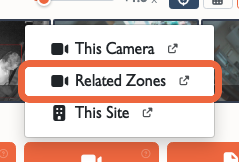
The menu omits Related Zones until the camera names at least one zone. Each operator opens only the zones their account may view live, so a zone outside that access is left off the wall.
Alarm Panics and Related Zones
This section applies to a site with an intruder panel reporting into TetherX over SIA or Contact ID. Set the panel up first, as described in Alarm Integration. A site with no panel uses Related Zones for Open Live alone.
On the alarm page, map each of the panel's own zones to the zone a camera watches. A panic or intruder message naming a mapped zone is then filed against that camera, so the event opens on the footage of what the panic was raised about.
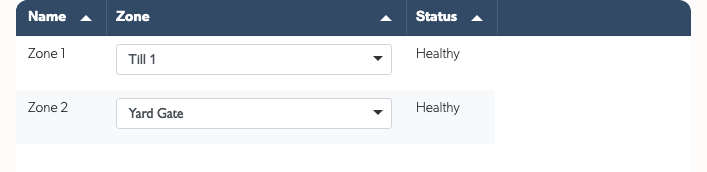
The same message marks the events of the related zones from the last five minutes as part of that alarm. An operator sent to the till camera sees the neighbouring footage marked as part of the incident rather than as ordinary motion.
Related Articles
Live View - How a live wall is built, and the layouts it can take. Monitoring Station Operator Guide - Handling an event from the operator console. Events - What opens an event and what it carries.

