Table of Contents
Alarm Integration (SIA/ContactID)
TetherX acts as an alarm receiving centre (ARC), accepting SIA DC-09 and Contact ID messages from IP communicators. A message that raises an alarm condition opens an event on the camera watching the zone that fired. An operator opens the panic on the footage of what the panel reported, and everyone on the site's notification list is told.
Compatible Alarm Panels
Any alarm panel with an IP communicator module supporting SIA DC-09 or Contact ID:
- Honeywell: Galaxy, LYNX, VISTA
- Texecom: via IP communicator, or serial integration
- DSC: PowerSeries, Impassa
- Bosch: Solution 2000/3000/6000
- Vanderbilt: Vigo/Vigor
- Inim Electronics
- Risco: LightSys
- Johnson Controls: C-addx Evolution/Networx/Patriot
- ADT: Pulse/Command
- Siemens: Sintony, Solution 844/862
- Napco: Gemini, Rapicon, StarLink
- Altronix: Hubway, ACM7000, ACM24V
- And many others with SIA DC-09 or Contact ID support
Connection Methods
| Method | Use When | Connection Details |
|---|---|---|
| TCP Server | IP communicators (standard) | sia.timeline.is port 2200 |
| REST API | Your own platform forwarding SIA to TetherX | See API |
TCP Server
1. Create an Alarm in TetherX:
Go to Alarms and add a Virtual alarm. Set a Transmitter ID (e.g., 900001) to link incoming messages to this site. Set Number of Zones to the number of zones the panel reports.
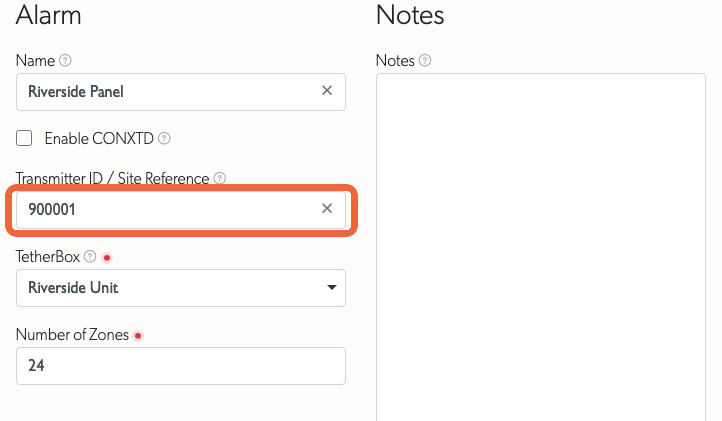
2. Configure your IP communicator:
- Host:
sia.timeline.is - Port:
2200 - Protocol: SIA DC-09 (SIA-DCS)
- Account/Site ID: Must match the Transmitter ID you set in TetherX
Tip: No API token required for TCP - authentication uses the transmitter ID to route alarms to the correct site.
REST API
Use the REST API if you are building your own platform or middleware that receives SIA messages and forwards them to TetherX. Create the Virtual alarm as in the TCP Server section above, with its Transmitter ID set to the account number your platform sends.
1. Find your Timeline API Token:
Open your user profile and copy the Timeline API Token.
2. POST the SIA string:
curl --request POST 'https://app.timeline.is/api/v3/alarms/sia_event?token=YOUR_TIMELINE_API_TOKEN' \
  --header 'Content-Type: application/json' \
  --data '{"alarm": {"sia_event": "[#900001|Nti22:02/ri01/PA1001|APanic Alarm]"}}'
The token can also be sent as a top-level token field in the body. Form-encoded bodies are accepted as well, using alarm[sia_event] as the field name.
| Response | Means |
|---|---|
200 |
The message was recorded |
400 |
The body could not be parsed as the content type it declares |
401 |
The Timeline API Token is not valid |
404 |
No Virtual alarm on a timeline the token reaches carries that transmitter ID |
422 |
The SIA string did not match the format below. The body names the segment that was rejected |
429 |
More than 100 requests a minute arrived from this IP address |
A 422 names the segment and the shape expected for it:
{"data":{"errors":["The area segment riXX is not valid. Expected ri followed by a two-digit area, such as ri01."]}}
Note: This endpoint is served under
/api/v3, not the/api/v3pprefix used by the OAuth2 endpoints. It uses the Timeline API Token, not an OAuth2 access token, and it does not accept anAuthorization: Bearerheader. See API for the full reference.
Report whether the panel is reachable
An alarm panel is a device TetherX cannot poll, so the panel or its receiver reports its own reachability to POST /api/v3/alarms/panel_state. Identify the panel by its Transmitter ID and send online as true or false.
curl --request POST 'https://app.timeline.is/api/v3/alarms/panel_state?token=YOUR_TIMELINE_API_TOKEN' \
  --header 'Content-Type: application/json' \
  --data '{"alarm": {"transmitter_id": "900001", "online": false}}'
- Send it whenever the state changes, and as a heartbeat. Repeating the state the panel already reported files no further event, so a heartbeat every minute is safe.
- A change is held for a settling period before anything is filed or sent, so a panel that drops and returns inside that window raises no event and emails nobody. A panel still offline at the end of it files an event against the site and notifies everyone who receives notifications for that site.
- Until the first report arrives, the alarm page shows Unknown rather than claiming a state. After it, the panel's own answer is the one shown.
Map each panel zone to the zone a camera watches
A SIA message names the zone that fired. Map each of the panel's own zones to the zone a camera watches, and a panic on the till's zone opens on the till camera: the event carries that camera's recording, its thumbnail and its map pin, and the zones named as Related Zones for that camera are marked as part of the same incident. A panel zone nobody has mapped still files an event, against the site, with no footage on it.
Open the alarm and use the Zone column of the Zones table. The panel's zone list fills in as the panel reports, so a zone appears once a message has named it.
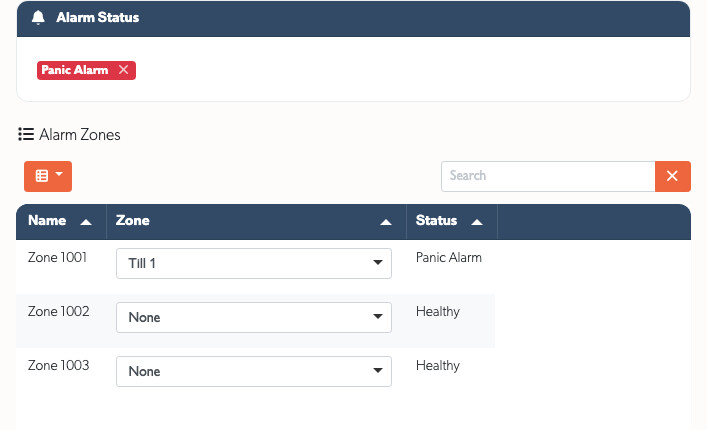
Alarm Status above the table carries what the panel last reported. A status clears when the panel sends the matching restore. Some conditions never get one: an arming report sends no restore, and a fault repaired on site stops being mentioned. Anyone who may arm the panel can dismiss a status with the cross on its badge, and the audit trail records who dismissed it and what it said. Dismissing sends no restore to a monitoring centre in your account's name.
SIA Message Format
SIA DC-09 is a standardised protocol from the Security Industry Association for transmitting alarm events over IP networks. Messages use human-readable ASCII with short codes.
The two connection methods accept different messages, so use the format that matches the method you are using.
TCP Server
The TCP server accepts the complete DC-09 frame as the IP communicator sends it, including the CRC, the "SIA-DCS" identifier, the sequence number and the trailing timestamp:
FEC9003B"SIA-DCS"0001L0#777[#777|Nri0001/DL510]_12:29:37,01-17-2022
- #777 - Site/transmitter ID (matches
transmitter_idin TetherX) - ri0001 - Area/partition
- DL - Event code (DL = Door Open, PA = Panic, BA = Burglary) - see SIA Event Codes for full list
- 510 - Zone number
Configure the account number in your IP communicator and TetherX handles the rest of the frame. A DC-09 frame carries no description, so an operator reads the standard wording for the code.
REST API
The REST endpoint accepts only the inner block, and validates each segment:
[#900001|Nti22:02/ri01/PA1001|APanic Alarm]
- #900001 - Site/transmitter ID (matches
transmitter_idin TetherX). Letters and digits only, so a customer reference such asSC01-900002is rejected. Send the account number the panel transmits, which is a run of digits, commonly four to six. - Nti22:02 - Timestamp. The literal
Nti, then a two-digit hour, a colon and a two-digit minute. - ri01 - Area/partition (e.g., Area 1). The literal
ri, then exactly two digits. - PA - Event code (PA = Panic, BA = Burglary, MA = Medical) - see SIA Event Codes for full list. Two characters, neither of which is a digit. A code ending in
R, such asPR, restores the zone to healthy. - 1001 - Zone number
- APanic Alarm - Event description. The literal
A, then the description, which must not contain digits.
A message that does not match this format is rejected with a 422 response. Validation starts at the opening bracket, so anything sent after the closing bracket is ignored rather than rejected.
Which codes raise an alarm
The two-letter code decides whether TetherX raises an alarm condition and notifies the site, so the description your panel writes after the A is recorded and shown but changes nothing. Nine codes raise one, and each files a trigger an operator can filter on alongside the same trigger from a camera:
| Code | Trigger |
|---|---|
BA |
Burglary |
PA |
Panic |
HA |
Duress |
MA |
Medical |
TA |
Tamper |
QA |
Emergency |
FA |
Fire |
GA |
Gas |
WA |
Flood |
Opening (OP) and closing (CL) report the panel's own state rather than a detector, so send those two on their own: [#900001|Nti22:02/ri01/CL|AClosing Report] records the panel as armed, and OP records it as disarmed. A panel that puts a user number after the code is accepted, and TetherX reads that number as a user rather than as a zone.
What an operator sees when a panic arrives
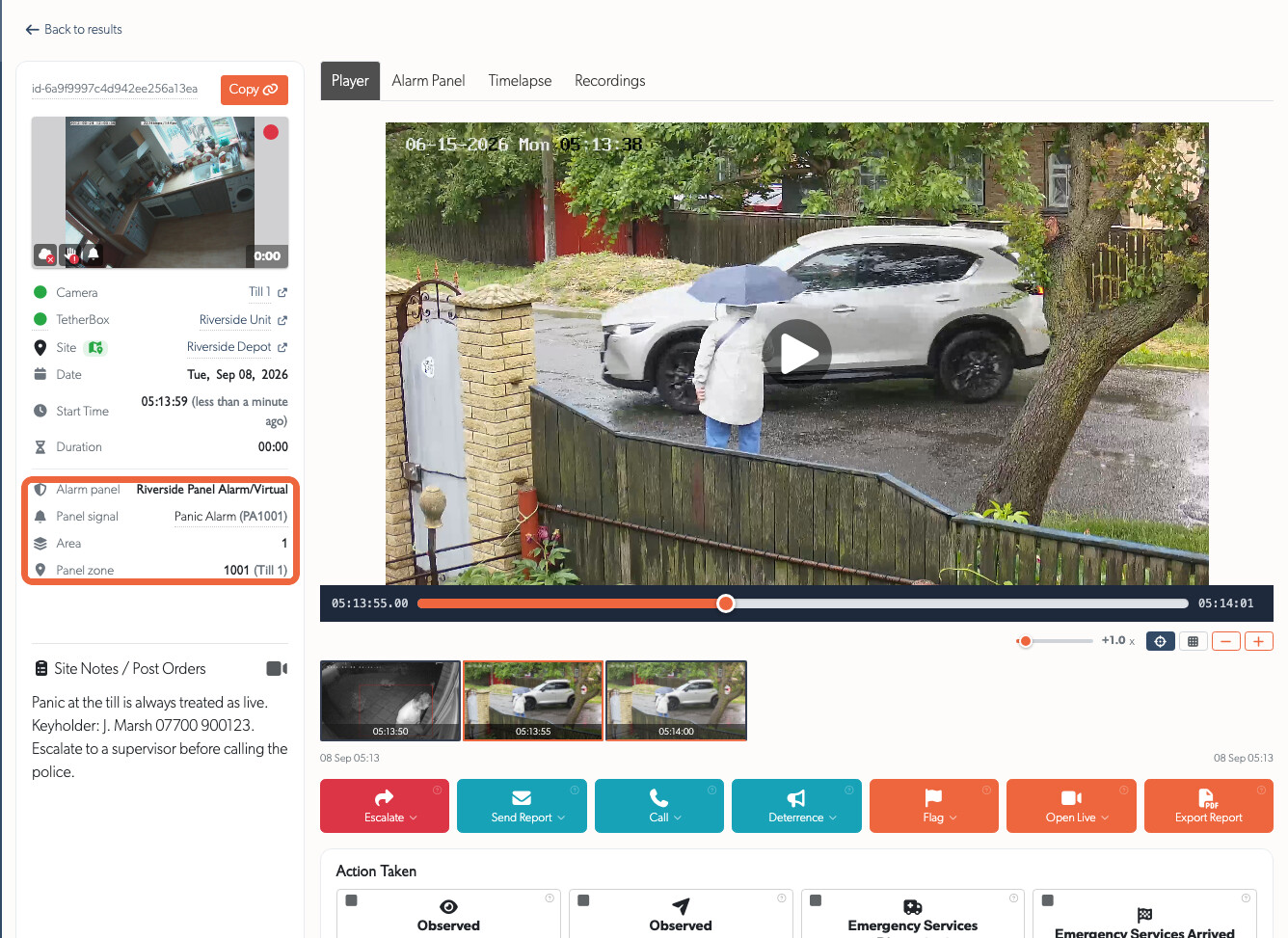
A panic on a mapped zone appears in the events list with the panel's signal on it, beside the ordinary camera events at that site.
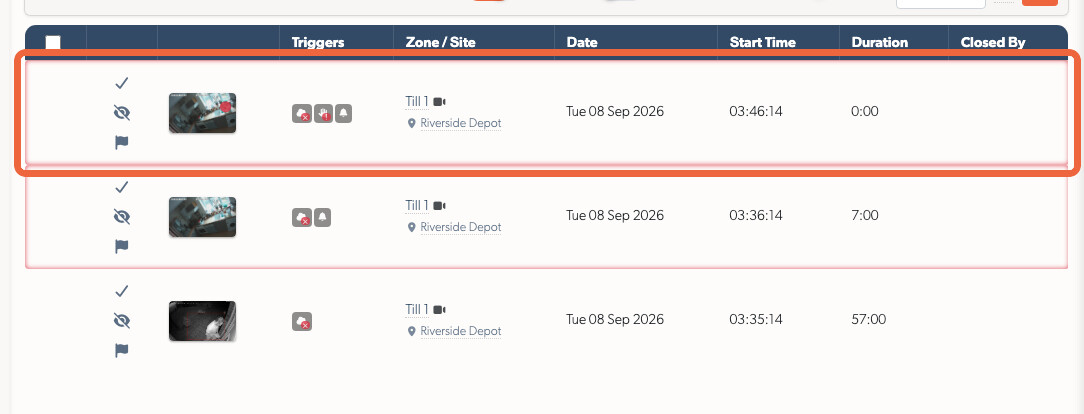
Open it, and the details list carries the panel that reported, the signal and its code, the area, and the panel's own zone number with the zone it is mapped to. The panel is a link for anyone who may open it. Point at the signal to read the exact string the panel sent, character for character, which is what you compare against the panel's own log.
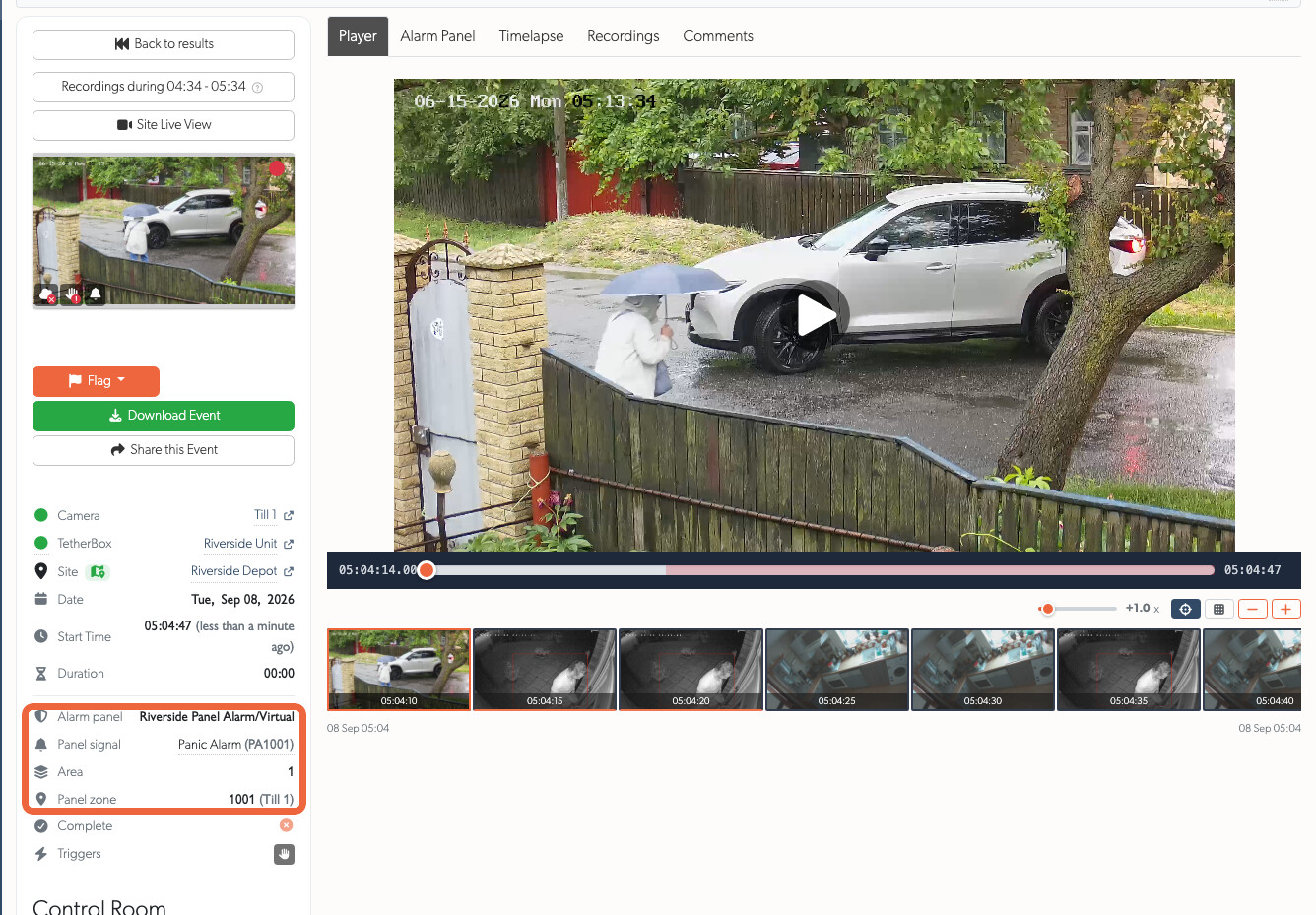
The operator console carries the same rows, so the person handling the panic reads the panel's own account of it beside the footage, the site's post-orders and the action toolbar.
Several messages, one incident
A panel rarely sends one message. A panic, a tamper on the same zone and a duress code a minute later are one incident. Every message that arrives while the event is open is attached to that event. The rows in the details list name the most recent one, and the Alarm Panel tab lists them all in the order they arrived, with the string that carried each.
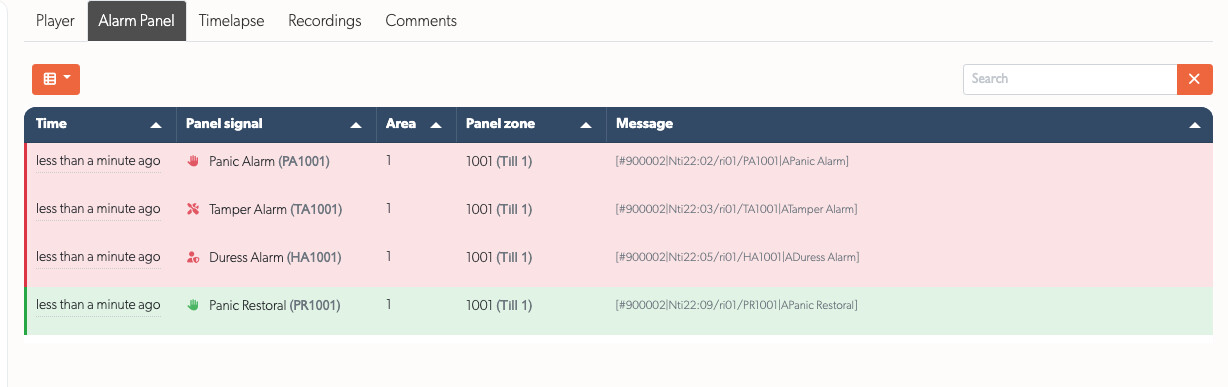
A message that raises nothing files no event: a restore closes a condition and an opening or closing report describes the panel itself, so neither joins an incident. Both are still recorded, and the panel's whole traffic is on the SIA Codes tab of the alarm.
Related Articles
- SIA Event Codes - Complete reference of all supported event codes
- Related Zones - Which cameras a panel zone's alarm marks alongside the one that fired
- Notifications - Who is emailed, and how to pause notifications
- API - REST API reference and authentication
Referenced in:

